Some users in Treasury log into Weiland (Fiserv product for commercial customers' account analysis/statement modeling) via Citrix Workspace. See related article on installing Weiland: https://fmhc.freshdesk.com/a/solutions/articles/47001167537
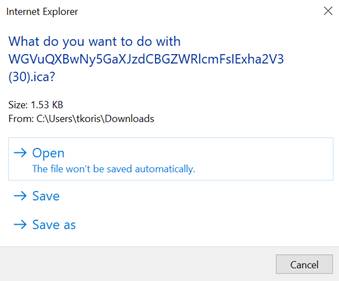
Occasionally, a user may see the following when downloading the .ica file to connect:
Per Fiserv:
It looks to me like you have not downloaded and installed Citrix Workspace.
Note: Before logging into the Hosted Site you will need to install the Citrix Workspace App Plugin. To find this please got to http://www.citrix.com/ and search for Citrix Workspace App. Download the Workspace app for Windows and Install.
Since Chrome is prompting you with what to do with the file it makes me think that Workspace is not installed on your machine or it is not associated with the .ica file.
First verify if you have this icon in your system tray (by your clock)

If you have it then go to Settings > Apps Default Apps and scroll to the end of the list on the right and select Choose Default apps by file type.
Scroll through the list of extensions till you find .ica and look at the associated application.
You should see this:

If you see a + then click that and see if the Citrix Connection manager is an option for you to select.
You may need assistance from your IT staff for this.
_______________________________________________________________
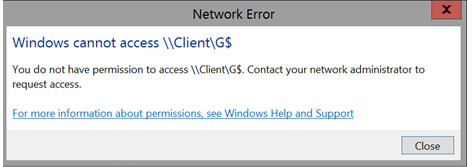
Another possible issue the user may see when trying to save a Weiland report to their computer:
Per Fiserv:
This is turned on by default for all customers, so this could be a setting in your Citrix Workspace that is not set to allow this access.
In your system tray right click on the Citrix Icon  and select Connection Center.
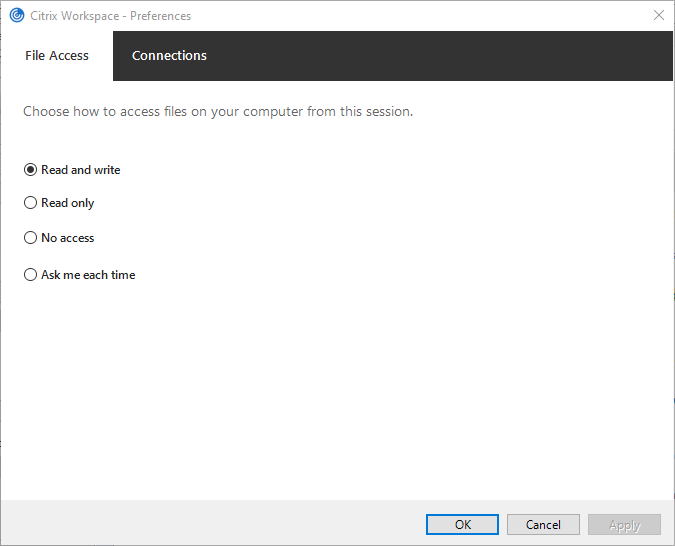
Click on the preferences button in the right pane.
From the File Access tab make sure the option is selected to Read and Write.
If this was already set them you may need to check with your network folks to see if something else in your environment is preventing this access.
If you are connecting to our site using Citrix then this could be a Setting in your environment that will need to be activated.
Was this article helpful?
That’s Great!
Thank you for your feedback
Sorry! We couldn't be helpful
Thank you for your feedback
Feedback sent
We appreciate your effort and will try to fix the article