Occasionally (usually after a Windows update), an Encompass user may encounter the following error message when attempting to send e-disclosures to a borrower:
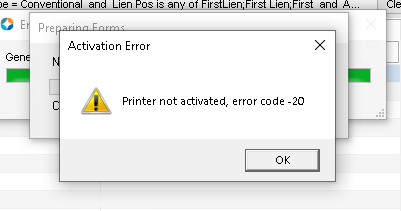
Usually, this is a quick fix:
- Remote into user's PC
- Make sure all instances of Encompass are completely closed
- Open the Registry Editor as admin (sometimes running as admin doesn't work, so find regedit in the Start menu --> Open File Location --> Shift+right-click to "Run as different user" and manually enter your admin credentials
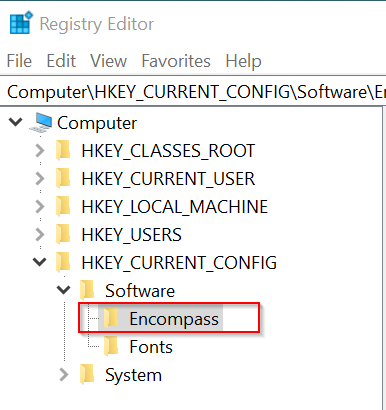
- Make sure this "Encompass" key is present under HKEY_Current_Config --> Software. If not, add it by right-clicking Software --> New --> Key
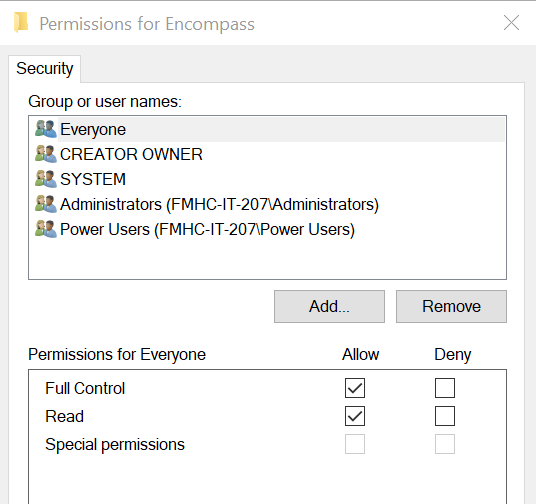
- Right-click Encompass --> Permissions... to ensure that "Everyone" has Full Control of this key. If not, Add "Everyone" and check the box for Full Control, then Apply your changes.
- Close Registry Editor, have the user log back into Encompass, and verify they can now print/send e-disclosures.
If the issue persists, the ticket may need to be escalated to Mortgage Support.
Was this article helpful?
That’s Great!
Thank you for your feedback
Sorry! We couldn't be helpful
Thank you for your feedback
Feedback sent
We appreciate your effort and will try to fix the article