List of machines that use CT Desktop Suite apps:
ffl-pc-001, fmb-pc-001, mfb-pc-001, war-pc-001, bgf-pc-001
As of 4/6/2026, all of these VM's have been updated to make sure they have functionality.
What was done?
Since there were multiple application errors even with users having both network drive and CT permissions, we needed to remover the CT desktop suite application. Even as DAA this was an issue. Instead, went to V:\Vision\Removeit and ran RemoveIt.exe as an admin while on the affected server. Select all and move them to the right and uninstall. Once done, and since these VM's are not tied to production and are treated as application servers, we were then able to restart. Once back up, went to V:\Vision\SETUP and ran setup.exe as admin. In there, we were told to only check these boxes for our needs:
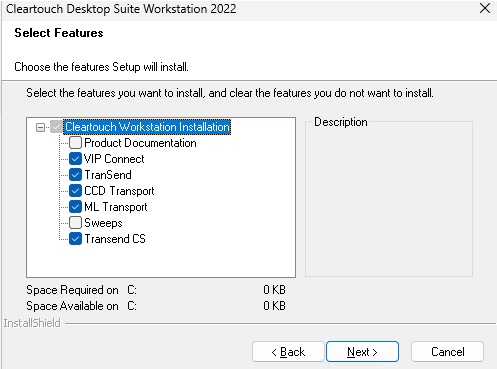
Then, clicked next and proceeded with the install. Once done, made sure mapdrivesvpn was ran so the V network drive showed, opened cleartouch, entered teller number, signed in (pick a role if necessary), and then access the applications from the left of the cleartouch application (tasks area). Were then able to access each of the applications with SSO.
Notes:
Fiserv recommends not using desktop shortcuts but rather accessing the applications from Cleartouch itself
Was this article helpful?
That’s Great!
Thank you for your feedback
Sorry! We couldn't be helpful
Thank you for your feedback
Feedback sent
We appreciate your effort and will try to fix the article