Occasionally, employees in Accounting or other Prologue users might complain that Prologue is running slowly.
First, check the Prologue server itself - launch Task Manager and see if resource utilization is high. Typically the worst latency could occur during month-end processing at the beginning of the month. As of Q1 2024, the Prologue server has 64 GB RAM and 16 virtual processors, so the server itself should not be utilizing too much CPU or memory.
Once you ascertain that it is not spiking, gather some more information from the users. Is the program itself fairly responsive, but reports are taking a long time to run? If reports are running slowly (e.g. a report that usually takes 5-10 seconds to run is now running in 30 seconds), follow the steps below.
AFTER HOURS (ensure that NO ONE is using Prologue), there is a utility within Prologue that can normalize the database. This process will remove all zero field files. Basically, it will defragment indexes for all 727 tables within the Prologue database and should improve the speed of running reports.
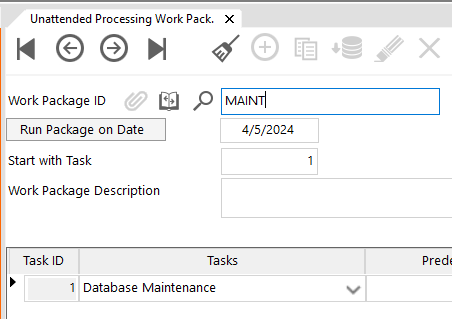
To run the utility, log into the Prologue server. Launch Prologue.exe as the Unattend account (see login credentials in KeePass). In the top-right search bar, search for "Unattended Processing Work Package." On the screen that loads, at the Work Package ID field, click the magnifying glass to search for available work packages. One is already set up called "MAINT" (double click it to open) that contains only one task called "Database Maintenance." Click the "Run Package on Date" button to begin the process. This may take some time. Check the status in the bottom-left corner of the application.
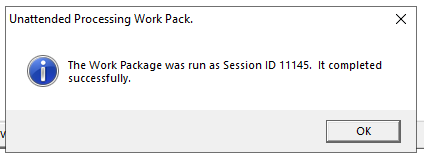
When complete, the following message should appear, and the status will show as "Ready" in the bottom-left corner of Prologue.
Have a user check to verify that reports now run in a timely manner.
Was this article helpful?
That’s Great!
Thank you for your feedback
Sorry! We couldn't be helpful
Thank you for your feedback
Feedback sent
We appreciate your effort and will try to fix the article