IT has a login for FFL's (FMHC's) Amazon Business account. Login credentials can be found in KeePass.
All requests for new hardware should be submitted to the Service Desk in the form of a Hardware Request Form, submitted by the department manager who has authority to request new purchases. If it is submitted by an end user for themselves, we need to first seek their manager's approval for the purchase.
Find the item you wish to purchase, select quantity, and add to cart. Under Account near the top right, you can go to "Your Orders" to see past orders so you can re-order the same model of a previously-ordered item (e.g. headsets, webcams, etc.).
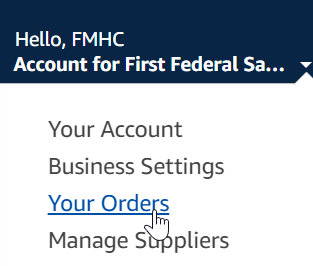
When you are done, proceed to checkout. You will be asked to enter some information:
GL Code: (for most equipment, this is usually 47620 - Equipment/Software Not Depreciated [expensed])
Cost Center: (enter the five-digit cost center code of the department or affiliate bank being charged for the order - IT is 90700) - find in the GL Department & Codes spreadsheet saved here: G:\IT\Service Desk\IT FORMS
Location: (enter the city to where the equipment is being sent, i.e. for Headquarters, put "Lakewood")
Department: (enter Bank and Department/Branch name, e.g. FMHC IT Department or FFL Lakewood Branch)
On the next screen, select the destination address from the list of options. If it is going to a specific individual, select the address you want to ship to, then you can indicate the employee's name in the "Deliver To:" field, if desired. (If the desired office address is not listed, one of our account admins can add the address to our account. Only work locations are listed, i.e. we do not ship from Amazon to users' personal home addresses.)
On the next screen, confirm the desired shipping option.
On the "Select a payment method" screen, ALWAYS* choose "Pay By Invoice." If an error message in red appears, one of the account admins may need to process payment of some outstanding/overdue invoices (if too many, our account could be maxed out, preventing more orders from being placed).
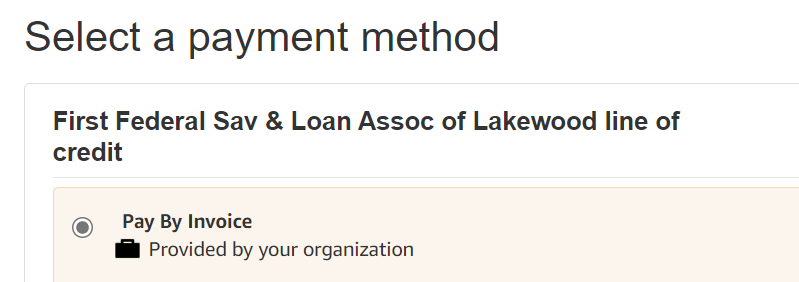
Review all information on the last screen, then place the order. Let the requestor know their order is on its way and provide the estimated date of delivery.
*NOTE: If you are ordering a gift card (occasionally requested by management), Amazon will not let you pay by invoice. There is a credit card on file in Amazon ending in 2678 - this is Ted York's in General Services. If the purchase should be charged through IT, enter Jerry's credit card info instead (see KeePass).
* * *
The Service Desk team will periodically review the account for posted invoices that need to be paid (Account --> Business Settings --> Your Invoices for Pay By Invoice). Invoices for orders placed by the IT department must be downloaded and emailed to AP@ffl.net to be processed for payment. This preferably should be monitored and done by the person who placed an order. Save the invoice PDF as "[item] [date purchased] [bank/department to be charged]," e.g. "Webcam 9-1-21 FFL Lakewood Branch."
Note: Invoices may not get posted immediately after an order is placed - it usually takes a couple of days for an invoice to be posted. Payment is due one month after the invoice becomes available.
Was this article helpful?
That’s Great!
Thank you for your feedback
Sorry! We couldn't be helpful
Thank you for your feedback
Feedback sent
We appreciate your effort and will try to fix the article
