Occasionally, an employee may run into a strange error message in Cleartouch, or the program may crash completely at some point. Below are some general troubleshooting tips from our past experience and from Fiserv.
First, reboot the computer. This works miracles.
If the program is crashing when launching CT Teller / Teller Capture, make sure that Amazon Corretto (32-bit or x86 version) is installed (we no longer install Java).
Re-register Cleartouch (delete the CTInstanceRegistration.config file first).
The compatibility mode on the printhost.exe: Turn off if on or turn on if off. C:\Cleartouch\Portal\Fiserv.cleartouch.Documentmanagment.printhost.exe >Properties>Compatibility > Compatibility mode> uncheck /check(Win7) the option to 'run this program in Compatibility mode> apply and OK
Confirm C++ 2015, 2017,2019 (X86) is installed on the machine / Repair C++
Verify the C:\Cleratouch folder is not read only
Turn off UAC on the machine
Confirm Cleartouch is a trusted site: https://10.46.*.* (this is handled globally, not on the user's workstation)
Confirm print receipts and validations is turned on in Teller - File>Workstation Options>print receipts and validations needs to have a check mark.
Ensure that the user is launching Cleartouch from the standard shortcut (directly on the desktop or in the Applications folder on the desktop), not an incorrectly-pinned shortcut on the taskbar.
(You can NOT start Cleartouch then pin that shortcut to the taskbar. You must right-click on Fiserv.Cleartouch.Desktop.Startup.Bootstrap.exe in the Cleartouch3 directory and pin THAT instead, if you want a working shortcut in your taskbar.)
If the user receives the following error message, you may need to re-register Cleartouch:
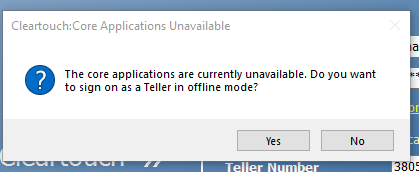
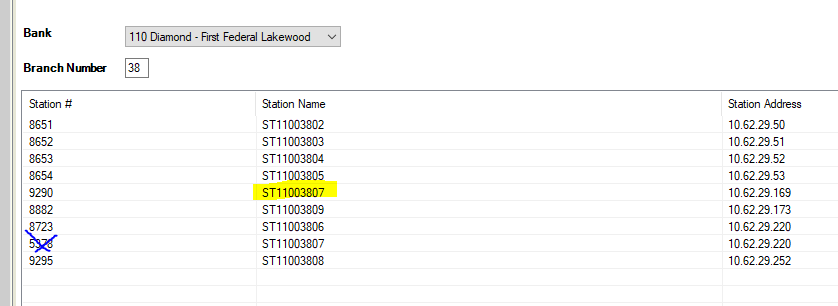
This may be an indication of two workstations with the same workstation ID/name, and the wrong one got registered. There are still some "old" workstations in the list that were used from the previous core/teller system.
When re-registering, follow the Master Network List/matrix to verify you are selecting the correct one that matches the Fiserv IP/Station Address.
Example:
Was this article helpful?
That’s Great!
Thank you for your feedback
Sorry! We couldn't be helpful
Thank you for your feedback
Feedback sent
We appreciate your effort and will try to fix the article