App Enabler is part of Nautilus (OnBase). It allows easy lookups of information in Nautilus through Cleartouch, i.e. you can Ctrl - double click on an account number or certain section of the screen in Cleartouch and it will pull up related account documents in Nautilus automatically. More detailed info can be found on the intranet --> Shared Info --> Corporate Records --> Applications Enabler.
To enable App Enabler on a user's machine, open their naunity.exe.config file in Notepad (located in C:\Program Files (x86)\Fiserv\Nautilus\Unity Client) and make the following changes:
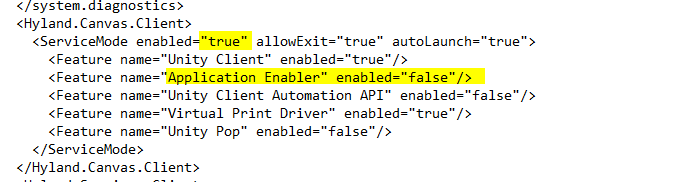
ServiceMode enabled must equal "true"
Application Enabler enabled must equal "true"
The default config file path must be specified for the user's specific department:
DefaultConfigFile="\\earth\Groups\Shared\AppFiles\AppEnablerXML\AEFFL.xml">
Was this article helpful?
That’s Great!
Thank you for your feedback
Sorry! We couldn't be helpful
Thank you for your feedback
Feedback sent
We appreciate your effort and will try to fix the article