Issuing New WireXChange Tokens
- Get new token out of box in Lakewood server room (file cabinet drawer)
- Mark new serial number on the WireXchange Tokens List (G:\IT\WireXChange)
- Wire Exchange Token Assignment form - send to new employee
- Branch managers do not need to go through Teller Training prerequisite for WireXChange access. Universal Bankers do need to wait; we get the OK from the Retail Trainer (Melinda Fellenstein) to set them up.
- File the completed form in G:\IT\WireXChange\Token Assignment Docs. Put employee's name and the token number in the file name.
- When one breaks, find old serial number in the spreadsheet and make asterisk note with name/date/initials/reason why.
Security Admin --> Select User for Update --> put in initials --> Update User Profile --> make sure Online Access & Active are set to Yes.
Assign Token --> hit radio button and select the token from dropdown list.
Accounting is responsible for ordering new tokens if we run out. Shipped directly to IT.
Bad token: Set aside for destruction (envelope in IT desk), delete from list in WireXchange portal and update spreadsheet.
(Update Security Tokens --> Delete old one --> Submit)
Tokens that start with 12 = Disaster Recovery
If user deleted then comes back, won't let you re-add them (Fiserv glitch). Just remove authorization, Online Access, and Active status.
If you make changes, you can't approve them (dual control). Another admin will need to approve your changes.
Admins for User Password Resets: IT Service Desk; Karen Patricy & Lauren Golick (Accounting)
Admins for User/Authorization Changes: IT Service Desk; Lauren Golick (Accounting)
User should NOT enter their token number when resetting their password, only when logging in.
i.e. When a temporary password is provided to the user, they should include the token number with their password at the initial login screen. When they go to reset it, they should ONLY use the temporary password (without any token number) as the old/current password.
User Authorization Changes
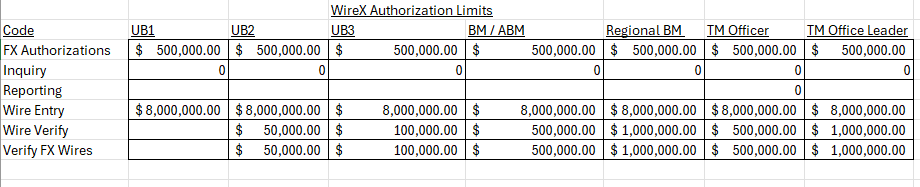
When an employee is promoted, they may have an automatic increase in their wire verification limits. See chart below for standard limits based on role in Retail/branch or Commercial:
- Universal Banker 2: $50,000 (as shown below)

- Universal Banker 3: $100,000
- Branch Manager (including Assistant Manager) and Treasury Management Officer: $500,000
- Regional Branch Manager and Treasury Management Leader: $1,000,000
Was this article helpful?
That’s Great!
Thank you for your feedback
Sorry! We couldn't be helpful
Thank you for your feedback
Feedback sent
We appreciate your effort and will try to fix the article