When staff log in to Cleartouch, they enter a four digit teller number. The security system in Cleartouch (Passport) only uses the last two digits when allowing an employee to log in. This is why it is important that staff at the same branch/department do not have the same last two digits of their teller number. The last two digits can be the same when the employee is signing in on terminals set up with different branch numbers. The Lakewood teller line is branch 01, IT is branch 70, the loan servicing department is branch 50, and loan operations is branch 53, to name a few.
Occasionally, someone will get set up with the same last two numbers as another employee. If this happens, the second person signing on forces the first person to be kicked out. To identify who the two users are that have the conflict you can use a report in Nautilus.
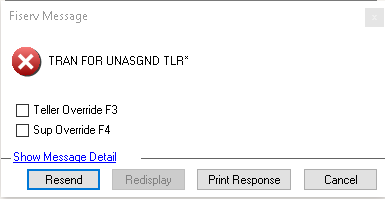
There might also be an occasion where two tellers are using different teller numbers, but their workstations are sharing the same Cleartouch license. This will also cause a conflict and balancing problems. The user might encounter a message in Cleartouch stating "Tran for Unasgnd Tlr" as shown below.
Was this article helpful?
That’s Great!
Thank you for your feedback
Sorry! We couldn't be helpful
Thank you for your feedback
Feedback sent
We appreciate your effort and will try to fix the article