Overview
Verafin is delivered as a remote application hosted on a Terminal Server environment. Users typically access Verafin through Work Resources, while administrators can access the underlying server through remote.ffl.net.
When users export documents from Verafin to Microsoft Office applications (such as Excel or Word), Microsoft Office must be properly authenticated within the user's Terminal Server session. In some cases, Office may display an "Unlicensed" message, preventing normal document integration and export functionality.
Symptoms
Users report one or more of the following:
Microsoft Office applications launched from Verafin display "Unlicensed".
Office documents fail to open correctly from Verafin.
Exporting data from Verafin to Word, Excel, or other Office applications does not function as expected.
Office applications prompt for activation or sign-in unexpectedly.
Cause
When a user authenticates to the Terminal Server, Microsoft Office typically signs in automatically as part of the session initialization process.
If the user's Terminal Server session becomes stale, disconnected, hung, or otherwise does not initialize correctly, the Office sign-in process may fail. As a result, Office applications within the session may appear as unlicensed and integration with Verafin may not work.
Resolution
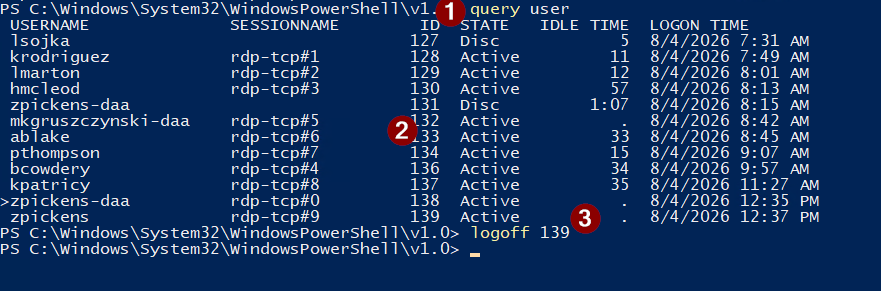
Connect to remote.ffl.net using Remote Desktop.Launch PowerShell with administrative privileges.
Run the following commands
- query user
- Locate the affected user and note their Session ID
- logoff user
Have the User Reconnect
- Ask the user to launch Verafin using their normal Work Resources access method.
- Verify whether Microsoft Office automatically signs in.
- Confirm that Office applications no longer display "Unlicensed" and that document exports function normally.
Manually sign in to office (If Necessary)
Was this article helpful?
That’s Great!
Thank you for your feedback
Sorry! We couldn't be helpful
Thank you for your feedback
Feedback sent
We appreciate your effort and will try to fix the article