Occasionally, a user (usually on a new computer) will encounter this error message when attempting to order checks in Cleartouch:
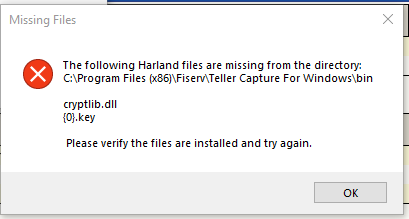
This error message indicates that these two files are missing from the specified directory.
If the old computer that this new PC replaced is still accessible, simply copy the two files over to the same directory.
You can store these files in both C:\Program Files (x86)\Fiserv\Teller Capture for Windows\bin and C:\Cleartouch3\Portal\
Otherwise, check another computer at the same branch to retrieve these files.
Alternatively, these files are saved in Teams: Fiserv Support - General --> Files --> Harland --> (select the appropriate affiliate) --> key files & cryptlib.dll
Included files can be found on a working machine:
C:\Cleartouch3\Portal
00222.key
00999.key
01858.key
C:\Cleartouch3\Portal
00222.key
00999.key
01858.key
74150.key
Cryptib.dll
Updated file location for Access:
Cryptib.dll
Updated file location for Access:
Teams: Fiserv Support - General --> Files --> Harland --> FMB > Cleartouch Portal Keys & cryptlib.dll
If the following error message is encountered:
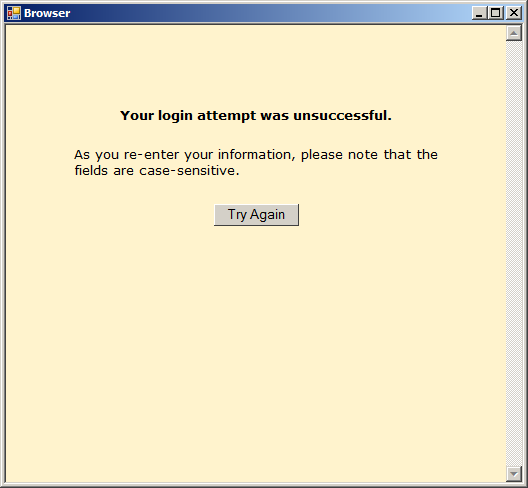
You may need to check the credentials stored in CT Admin --> Third Party Vendors for Harland. Their support may need to unlock the account or change the password. This information is set separately for each branch in CT (not a bank-wide setting) and would need to be added if a new branch opens. See passwords saved in the IT KeePass.
Was this article helpful?
That’s Great!
Thank you for your feedback
Sorry! We couldn't be helpful
Thank you for your feedback
Feedback sent
We appreciate your effort and will try to fix the article