When a branch loses power, the procedure is to hold all transactions for processing later when electricity is restored.
For network connectivity issues (whether they cannot access the CT service machine OR the Teller Capture Store & Forward [SAF] server), branches may run CT Teller in Offline Mode with Teller Capture still turned on. This will allow them to process transactions locally until network connectivity is restored.
As of August 2023, the main CT servers have been centralized and virtualized, so would not be accessible to a branch if they lose network connectivity. See chart below for the new server names that replaced the physical CT machines at each branch.
NEW Cleartouch Service Servers (2023 - under construction):
| Institution | Primary CT Server (new proposed names) | Backup CT Server (new proposed names) |
| FFL - all branches and back office departments | WCLECT01 (WCLECTFFL1) | WCOLCT01 (WCOLCTFFL1) |
| FFL extra (if needed) | WCLECT02 (WCLECTFFL2) | WCOLCT02 (WCOLCTFFL2) |
| Martinsville | WCLECT03 (WCLECTMFSB1) | WCOLCT03 (WCOLCTMFSB1) |
| FMB | WCLECT04 (WCLECTFMB1) | WCOLCT04 (WCOLCTFMB1) |
| Blue Grass | WCLECT05 (WCLECTBG1) | WCOLCT05 (WCOLCTBG1) |
| Warsaw | WCLECT06 (WCLECTWAR1) | WCOLCT06 (WCOLCTWAR1) |
In the event a CT server goes down at Cleveland, IT Engineering can bring up a Veeam backup of the same server in Columbus using the exact same server name. So, once the backup is up and running in Columbus, no changes should be needed in CT Admin / Define Branches as the branches will continue to point to the exact same server name. DNS will handle pointing the name to the updated server IP address.
Branches should NOT run CT Teller without Teller Capture. Teller Capture should always remain on, otherwise, none of the tickets will make it to the archive and accounting entries may be affected.
In the event internet/network connectivity is lost to Cleveland (where all CT and SAF servers currently reside), IT can switch a bank's CT and/or SAF server to the backup. This was formerly set in CT --> CT Admin --> Define Branches --> in the branch settings, scroll all the way down to the bottom to change the SAF server IP address*, and see the dropdown menus in the middle left for the CT server selection.
Effective November 2022, we have tested CT Admin and verified that we can put the actual server name in Define Branches instead of the server's IP address. Now, in the event we need to switch a branch to a backup server, we only need to change the DNS record of the server to point to a different IP address and leave CT Admin alone. The change will automatically propagate after 15-20 minutes, or the end user can perform a DNS flush in a Command Prompt to pick up the change immediately.
Store & Forward Server Info
Institution | Primary SAF Server (new proposed names) | Backup SAF Server (new proposed names) |
| FFL (all branches except Dublin)* (new server will include Dublin) | WLKWSCO01 & WLKWSCO02 (WCLESCOFFL1 & WCLESCOFFL2) | WCOLSCO03 (WCOLSCOFFL1) |
| FFL (Dublin branch only) | WCOLSCO03 (n/a - will use WCLESCOFFL2) | WLKWSCO02 (n/a - see above) |
| FMB only | WCOLSCO04 (WCLESCOFMB1) | WLKWSCO04 (WCOLSCOFMB1) |
| BGFSL only | WCOLSCO05 (WCLESCOBG1) | WLKWSCO05 (WCOLSCOBG1) |
| WFSL only | WCLESCO06 (WCLESCOWAR1) | WCOLSCO06 (WCOLSCOWAR1) |
| MFSB only | WCLESCO07 (WCLESCOMFSB1) | WCOLSCO07 (WCOLSCOMFSB1) |
| CT Training Bank | WCLESCOTR01 (n/a) | n/a |
Each member bank can NOT share SAF servers with other member banks - they must only use the ones assigned to them as primary and backup.
*Full FFL Branch breakdown:
| Branch Number | Branch Name | Primary SAF Server |
| 1 | Lakewood | WLKWSCO01 |
| 2 | North Ridgeville | WLKWSCO01 |
| 3 | Westlake Detroit | WLKWSCO01 |
| 4 | Westlake Crocker | WLKWSCO01 |
| 5 | Olmsted Township | WLKWSCO01 |
| 6 | North Olmsted | WLKWSCO01 |
| 7 | Rocky River | WLKWSCO01 |
| 8 | Fairview Park | WLKWSCO01 |
| 9 | Avon Lake | WLKWSCO02 |
| 10 | Call Center / CRC | N/A |
| 11 | Strongsville | WLKWSCO02 |
| 12 | N/A | N/A |
| 13 | N/A (Columbus DC) | N/A |
| 14 | Avon | WLKWSCO01 |
| 15 | Chagrin Falls | WLKWSCO02 |
| 16 | Parma | WLKWSCO02 |
| 17 | Garfield Heights | WLKWSCO02 |
| 18 | North Royalton | WLKWSCO02 |
| 19 | Brunswick | WLKWSCO02 |
| 20 | Concord | WLKWSCO02 |
| 21 | Gordon Square | WLKWSCO02 |
| 22 | Dave's Midtown | WLKWSCO01 |
| 23 | Dublin | WCOLSCO03 |
| 24 | Centerburg | WLKWSCO02 |
| 59 | Commercial Ops | WLKWSCO01 |
| 60 | Accounting Dept. | WLKWSCO01 |
| 712 | Community Development | WLKWSCO01 |
In the event of SAF issues at all banks/branches, the Service Desk & Core teams will divide the responsibility of restarting services and communicating with each bank/specific branches as follows (as of December 2025):
| Member Bank | Primary Server Name | SD & Core Agents Responsible |
| FFL (1) | WLKWSCO01 | Max & Akbar |
| FFL (2) | WLKWSCO02 | Anthony & JohnR |
| FFL (3) | WCOLSCO03 | Noah & Akbar |
| FMB | WCOLSCO04 | Illia & Lisa |
| Blue Grass | WCOLSCO05 | Jessica & Alysia |
| Warsaw | WCLESCO06 | Nick/delegate & JohnR |
| Martinsville | WCLESCO07 | Nick/delegate & Lisa |
| CT Training Bank | WCLESCOTR01 | (whoever is available) & Alysia |
If network connectivity is lost during business hours and a branch/member bank needs to be switched to the backup during the day, it may be done. Batches on the primary server will go through and be processed once network connectivity is restored. If any batches were still open, the SAF support team at Fiserv can remote into the SAF server and see the status of batches. If necessary, they can force-close batches there without needing to rely on the usual way of closing batches in CT Teller. Call 855-234-7378, option 3, option 2 (or 3), opt 1. Alternatively, for time sensitivity, Fiserv was kind enough to provide written instructions on this process so that we can handle force-closing batches on the SAF server ourselves. See Word doc attached.
*SAF Servers with IP Addresses:
| Current IP Address | OLD IP Address | Server Name |
| 192.168.101.2 | n/a | WCLESCOTR01 (Training Bank 100D) |
| 192.168.101.24 | 172.16.100.45 | WLKWSCO01 (FFL Prod 1) |
| 192.168.101.25 | 172.16.100.46 | WLKWSCO02 (FFL Prod 2) |
| 192.168.101.26 | 172.16.100.47 | WLKWSCO04 (FMB Backup) |
| 192.168.101.27 | 172.16.100.48 | WLKWSCO05 (BG Backup) |
| 192.168.101.78 | n/a | WCLESCO06 (WFSL Prod) |
| 192.168.101.79 | n/a | WCLESCO07 (MFSB Prod) |
| 192.168.101.28 | 192.168.13.30 | WCOLSCO03 (FFL Dublin Prod / FFL Backup) |
| 192.168.101.29 | 192.168.13.31 | WCOLSCO04 (FMB Prod) |
| 192.168.101.30 | 192.168.13.32 | WCOLSCO05 (BG Prod) |
| 192.168.13.55 | n/a | WCOLSCO06 (WFSL Backup) |
| 192.168.13.56 | n/a | WCOLSCO07 (MFSB Backup) |
If any of these SAF servers have their internet traffic routed through a new public IP address (i.e. through a new data center), Item Processing must be notified of the new public IP address so they can whitelist it on their end, allowing check batches to be delivered and processed successfully. Fiserv IP only makes these changes on Tuesdays and Thursdays, so please plan accordingly.
If Fiserv IP asks for one of our ABA/routing numbers:
FFL: 241071212
FMB: 244270191
BG: 242170549
Issues Post-Windows Updates or Software Updates
Occasionally, the branches will report error messages regarding "Store & Forward Server" communication issues. This sometimes occurs after the SCO server restarts following Windows updates. These issues can usually be resolved by logging into the appropriate SCO server (listed above) and restarting the services.
There are two batch files on the desktop of each server that will stop and start the services for you (make sure you run as admin).
After you run the Start Services batch file, open Services to verify these are all running. Sometimes they don’t all start:
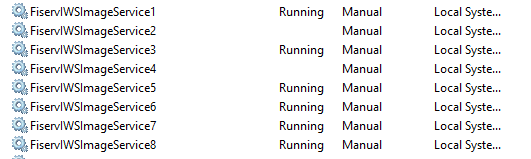
All eight of these services need to be running for Teller Capture to work properly, along with the two Apache services and the DB2 services.
We have asked Fiserv SAF Support about setting these to start in Task Scheduler after any reboot of the server, and this was their response: "The FiservIWS are dependent on the Apache-IWS service starting first so typically we let the scheduled task start the services. Maybe make sure the user on the Task Scheduler has the rights to start these services. Since you are having issues, you can try setting the FiservIWS services to Automatic but it's also recommended to set the Apache services to Automatic as well then."
On Monday, April 3, 2023, around 3:30 pm, all branches at all member banks that use Teller Capture reported the following error in Cleartouch:
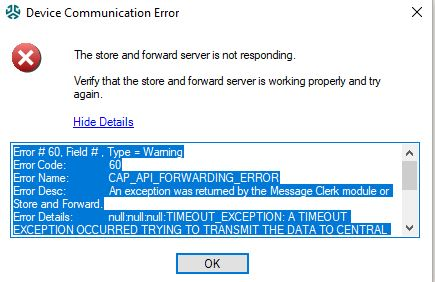
All branch workstations could ping their SAF server and the services were all running on these servers. Fiserv SAF support (800-448-2851) ultimately determined that the issue was caused by an Amazon Corretto update that installed that day. Per engineering, those updates were getting pushed automatically from Ninite but we had no control over the timing. (As of August 2024, we can now manually control pushing of updates to these servers in Ninite.)
The resolution was to stop the SAF services, uninstall both versions of Corretto, reinstall both versions (x64 and x86), then start the services again.
When this recurred on 11/14/24, we believe Corretto updates were installed anyway (despite Ninite configured to NOT do so automatically), but the resolution was simply to stop and start the SAF services, no reinstallations necessary.
This error reoccurred on 11/13/25, to fix, remote into the affected SAF server, run stop services, open task manager and kill the services, run start services, issue should be resolved once the UBs exit and reopen CT.
Branches may receive the following error and have CT crash when attempting to close batches. This may be due to the above issue occurring at the same time the teller was in the middle of an open batch, but the message should clear itself up by the next business day. It will not affect the branch's ability to balance for the day.
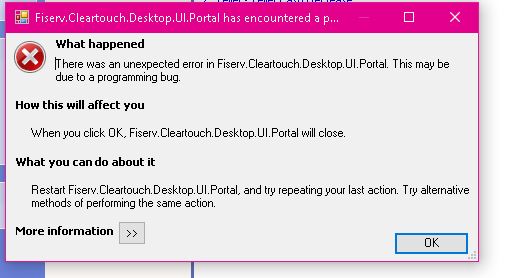
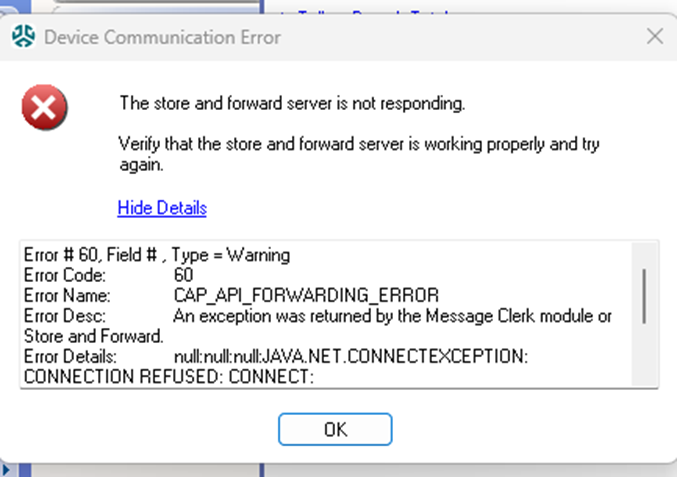
If you encounter the below error message, stopping & starting the services on the SAF server resolves: 3/28/26
Was this article helpful?
That’s Great!
Thank you for your feedback
Sorry! We couldn't be helpful
Thank you for your feedback
Feedback sent
We appreciate your effort and will try to fix the article