Several bank employees, mostly in Deposit Operations, have a SecurID or Soft Token for access to the MasterCard Connect website. After RSA SecurID (G:\IT\Apps\RSA SecureID) has been installed on the user's computer, the user should receive an email from MasterCard similar to the one shown below. It has detailed steps to follow for the user to access the site using their Soft Token.
Hello.
You have recently been granted access to a MasterCard Connect application(s) that requires the use of a SecurID (SoftToken). To access the secure application, you must complete the following steps:
1. Open the attached RSA Guide and follow the instructions to install the RSA application. Please ensure you have installed the RSA application on your desktop before attempting to import your SecurID. (See attached file: RSA Application DOWNLOAD Instructions.docx)
****Admin Privileges may be required in order to install this Software on the user’s machine****
If you are unable to install the RSA application on your computer, contact your company’s technical support team.
2. Open the attached .zip file and double-click on the enclosed token seed file (.sdtid). This will import your SecurID Soft Token into the RSA application.
(See attached file: p046866.zip)
3. Click the link to access the MasterCard Connect Sign In www.mastercardconnect.com
4. Please follow steps below to activate your token to create your four to eight digit PIN.
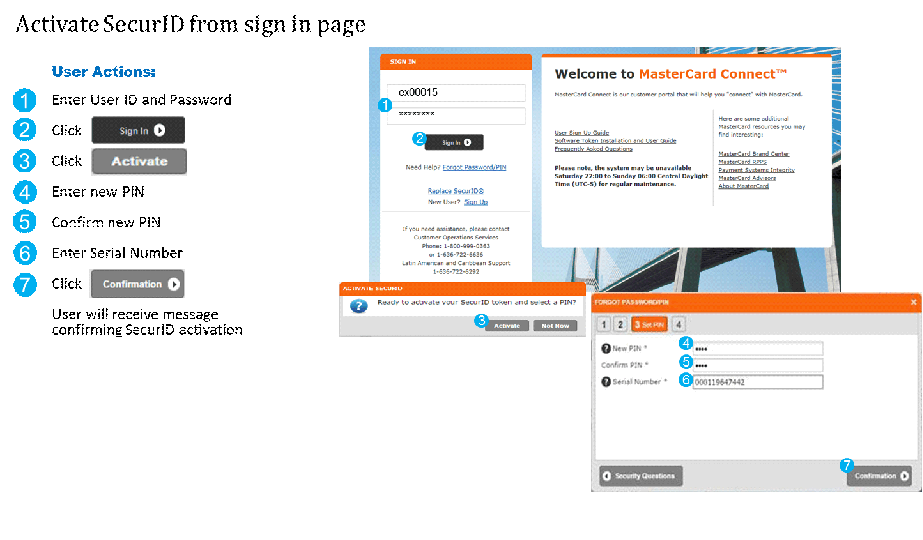
5. Access the RSA application, on your desktop, and enter your newly created PIN.
This will generate an 8 digit passcode that should be entered in the password field during the MasterCard Connect sign in process. You DO NOT need to re-enter your PIN in the MasterCard Connect password field; only enter the 8 digit passcode from the RSA application.
If you have any questions or need assistance, please contact Customer Operations Services.
Phone: 1-800-999-0363 or 1-636-722-6636
Spanish Language Support: 1-636-722-6292
Regards.
MasterCard Connect
Was this article helpful?
That’s Great!
Thank you for your feedback
Sorry! We couldn't be helpful
Thank you for your feedback
Feedback sent
We appreciate your effort and will try to fix the article