Fiserv Web Capture admin portal for FFL: https://ipabcprod.fiservsco.com/WebCaptureWeb/
Portal for FMB: https://capture-sco2.fiservsco.com/WebCaptureWeb
Portal for Blue Grass: https://capture-3.fiservsco.com/WebCaptureWeb/
Portal for Warsaw: https://ipabcprod.fiservsco.com/WebCaptureWeb/
Portal for MFSB: https://capture-sco2.fiservsco.com/WebCaptureWeb/
IT Service Desk serves as a backup to Retail Ops for password resets only. User setup, deletion, and activation is handled by the respective departments.
Once logged in, go to the User menu --> View FI Admins** to see the user list (all Retail/branch Web Capture users are set up under FI Admins).
Then, follow the instructions attached to send a password reset email to a user.
*NOTE: Martinsville First (MFSB) has a different Web Capture link: https://capture-sco2.fiservsco.com/WebCaptureWeb/
As of August 2023, MFSB staff share one login to scan their customer checks, as opposed to FFL where each individual user has their own login. This account (277mfsbscan, Warsaw Federal users and Loan Service users) are NOT listed under "View FI Admins" like the other users are. Instead, go to Customer tab --> View Customers --> under customer name "Martinsville FSB #001" row, Action column: View Users --> from there, you can edit or reset the 277mfsbscan user.
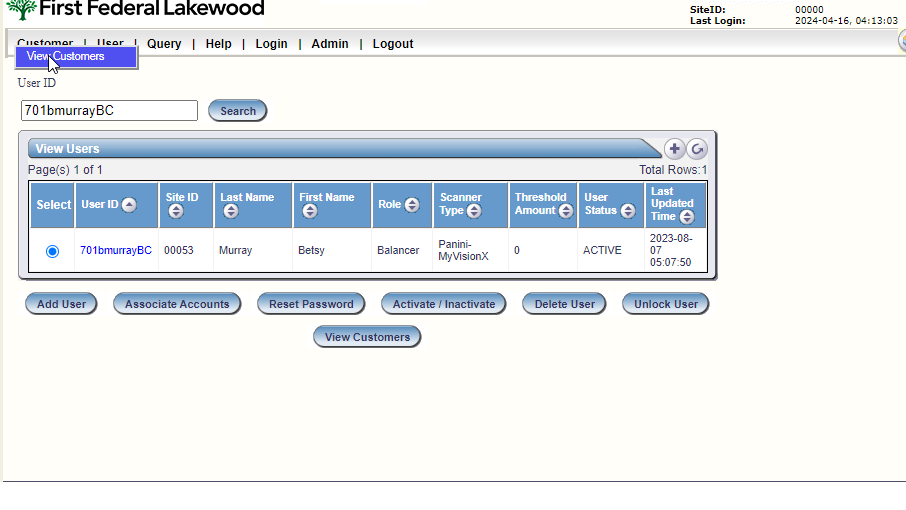
**NOTE: Loan Service department (Branch Capture) users are NOT listed under "View FI Admins" like other Web Capture users are. Instead, go to Customer tab --> View Customers as shown below:
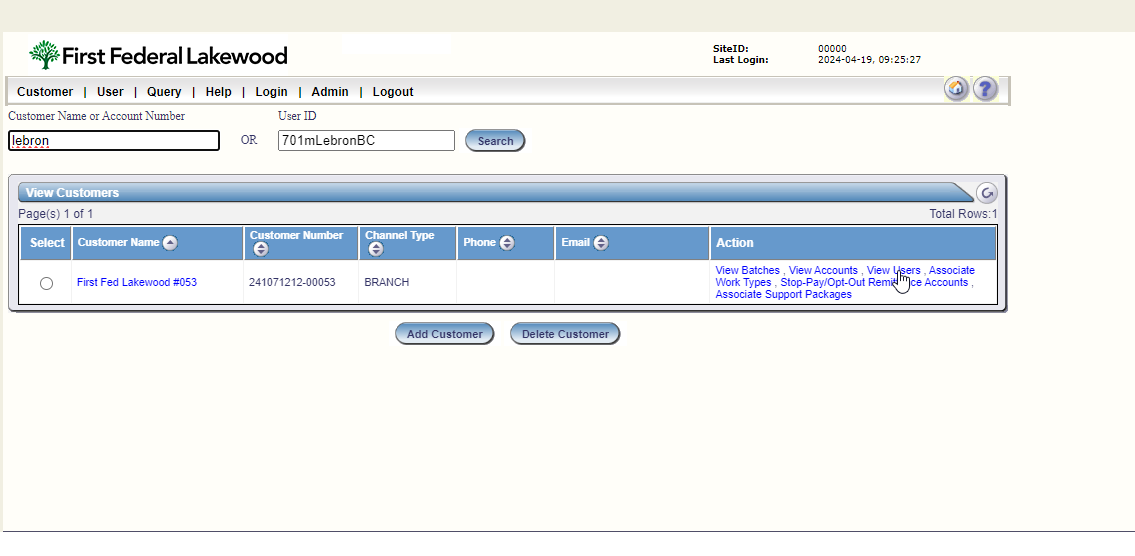
 Under customer name "First Fed Lakewood #053" row, Action column: View Users --> from there, you can search by user name (for example, Madelyn LeBron can be searched by 701mlebron) and proceed to password reset.
Was this article helpful?
That’s Great!
Thank you for your feedback
Sorry! We couldn't be helpful
Thank you for your feedback
Feedback sent
We appreciate your effort and will try to fix the article