In Cleartouch, generally all G/L transactions are coded using this format: 150009BBB0
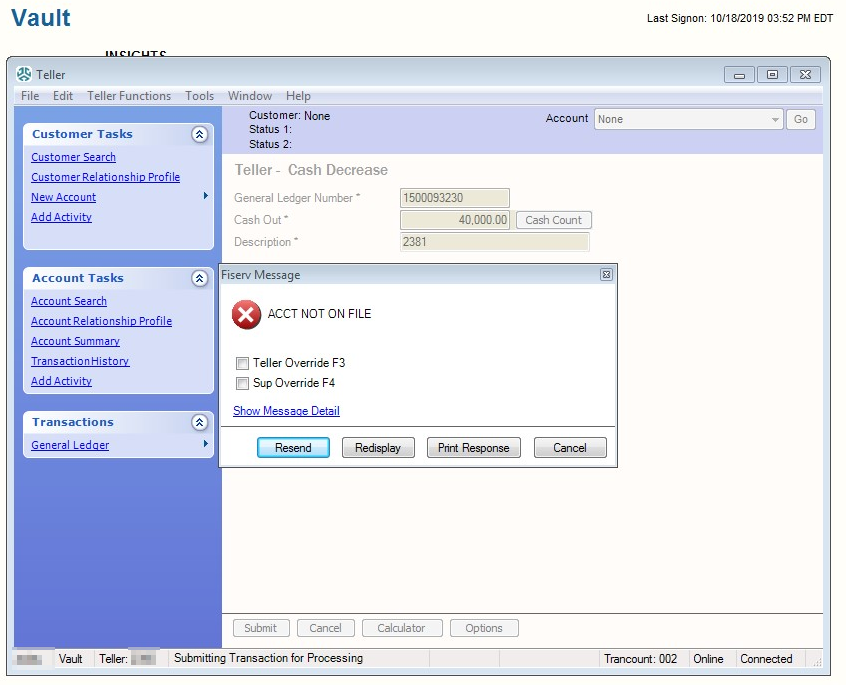
As we set up new branches, like Columbus/Dublin (323), they may be set up differently due to the three-digit branch numbering. An exception can be made in Cleartouch to allow these branches to balance the vault and perform other transactions that would otherwise be blocked. (The General Ledger Number field is greyed out on the user's end, preventing them from modifying it on their end.)
Users may be receiving the following error message before the exception is added:
1. In Cleartouch, go to Tasks --> CT Administration --> Teller Options --> Customize Transactions
2. Click the New Exception button (right column) while highlighted on Teller Cash Increase and Teller Cash Decrease.
3. Hard-code the GL code (e.g. 1500064323 for Columbus/Dublin) as an exception for that specific branch ONLY, for all roles.
4. Have branch manager verify the vault can be balanced or the other transaction they were attempting previously can now be run.
Was this article helpful?
That’s Great!
Thank you for your feedback
Sorry! We couldn't be helpful
Thank you for your feedback
Feedback sent
We appreciate your effort and will try to fix the article