When an employee leaves the company, IT must follow up with the user, their manager, and/or HR to ensure all FMHC-provided equipment is returned. This may include a laptop computer, docking station, monitor(s), and other peripherals.
To avoid any guesswork, we can proactively track this equipment using the Relations section of Lansweeper.
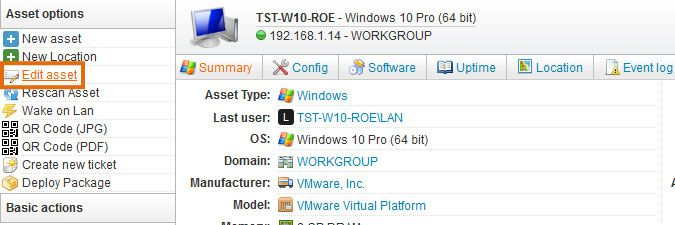
Search for any computer in Lansweeper, then click Edit Asset:
Here, you can add a new "Used By" entry and tie the computer to a user in AD. Add any additional comments, such as that a docking station was provided, for other assets that are not visible as separate assets in Lansweeper.
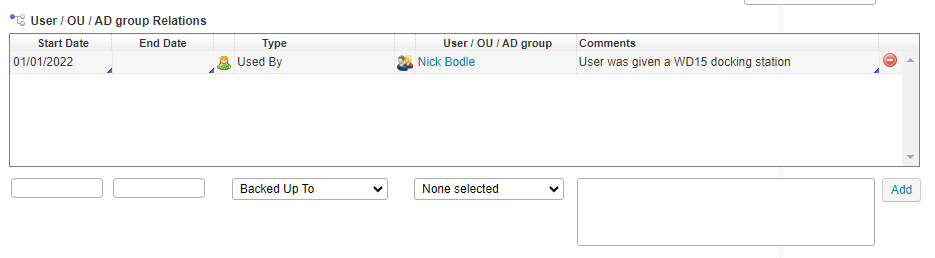
Click Add, then Save Asset in the top left corner to save changes.
See details about tracking "other assets" (like peripherals) in Lansweeper at the following link. These devices do not report any information to Windows so they are not automatically tracked by Lansweeper. While we could manually set up an asset for these devices, it may just be easiest to add them to a comment in the relation entry you created above. https://community.lansweeper.com/t5/general-discussions/tracking-assets-like-docking-station-mouse-and-keyboards/m-p/8509#post61985
Source: https://community.lansweeper.com/t5/managing-assets/link-assets-to-other-assets-or-users/ta-p/64304
Was this article helpful?
That’s Great!
Thank you for your feedback
Sorry! We couldn't be helpful
Thank you for your feedback
Feedback sent
We appreciate your effort and will try to fix the article