Effective 2020, IT moved away from using one standard local administrator password on each computer/server. Instead, each machine now has its own random local admin password. The password is stored in AD for reference.
Effective 2025, the LAPS password is now stored in its own tab in Active Directory:
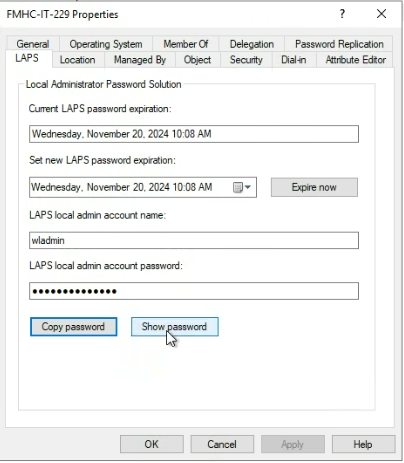
To force reset the LAPS password, click Expire now, run a gpupdate /force on the local machine, then refresh AD.
The user can be provided these local admin credentials in order to install/uninstall a piece of software on their own when off the VPN, i.e. Sophos Connect when we cannot remotely access their computer. Username will be in the format: [pc name]\ghostrider - e.g. FMHC-IT-123\ghostrider
NOTE: The local "administrator" account has been disabled for security reasons. The new local "admin" account is called "ghostrider."
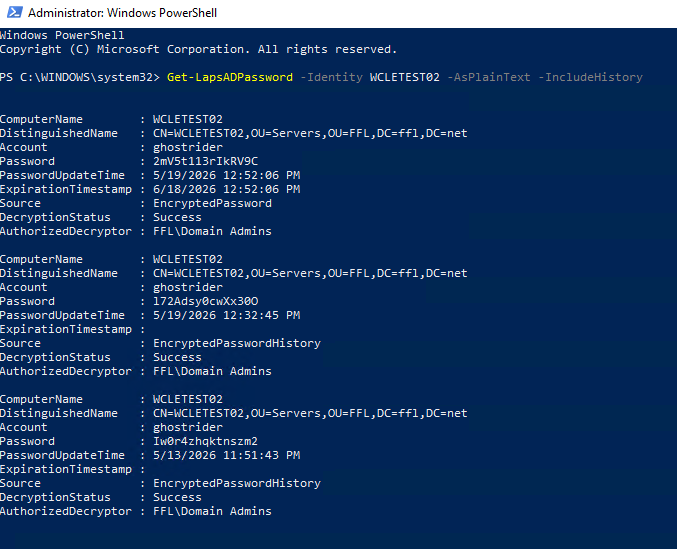
On May 19, 2026, IT enabled LAPS password encryption, which allows AD to keep LAPS password history -- so that if we need to restore a server from a previous time and the LAPS password has changed, we can access that previous password. The current LAPS password is still visible to Domain Admins in ADUC > ServerA > Properties > LAPS tab. However, if you ever need to access previous passwords for a server, you will need to log into a Domain Controller and run the following script in an elevated Powershell session: Get-LapsADPassword -Identity Servername -AsPlainText -IncludeHistory
This will give you a list of the current password as well as up to 4 previous passwords. Contact MattF with any questions.
Example:
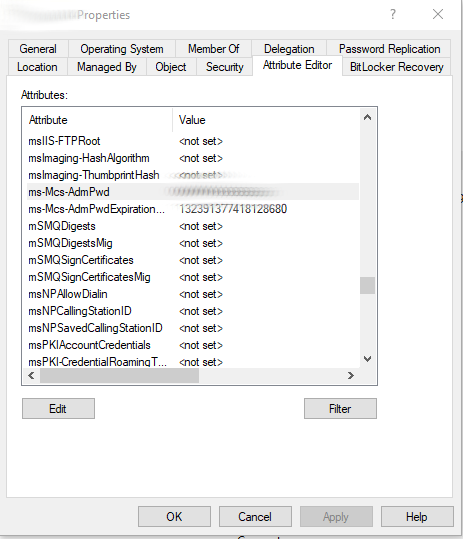
Old steps (2024 and earlier): In AD, find the computer in its OU (you cannot just search for it) --> right-click and select Properties --> Attribute Editor tab (you will not see this tab if you found the computer via search) --> scroll to ms-Mcs-AdmPwd to view the local admin password.
The user can be provided these local admin credentials in order to install/uninstall a piece of software on their own when off the VPN, i.e. Sophos Connect when we cannot remotely access their computer. Username will be in the format: [pc name]\administrator - e.g. FMHC-IT-123\administrator
Was this article helpful?
That’s Great!
Thank you for your feedback
Sorry! We couldn't be helpful
Thank you for your feedback
Feedback sent
We appreciate your effort and will try to fix the article