Credit Quest SSO Setup

Modified on Wed, Nov 27, 2019 at 3:03 PM

This article will describe how to configure the SSO feature within Credit Quest.
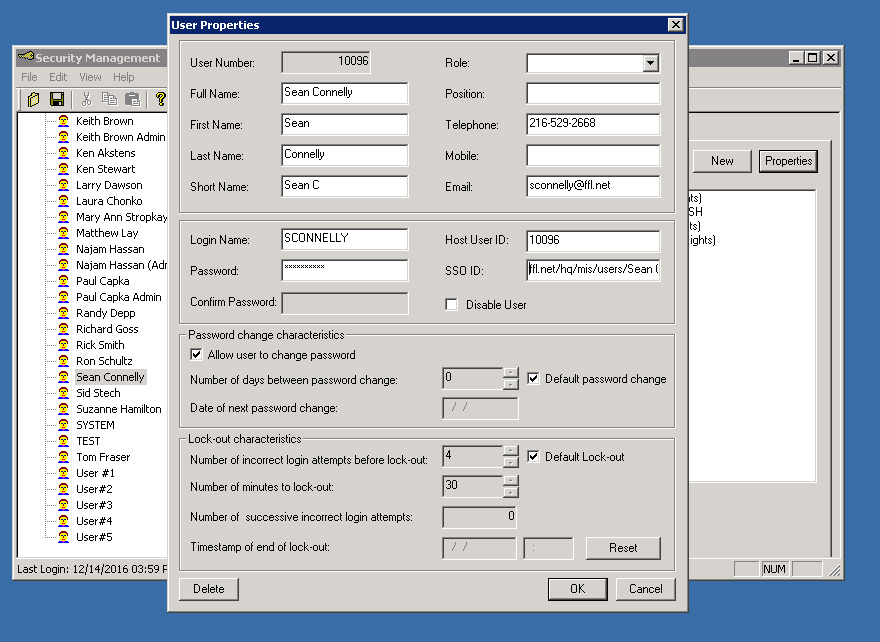
  1. 1. Log into Security Manager

    1) RDP to Credit-qst-64
    2) Start Security Manager under Start, refer to Keepass for the username and password.
    3) Expand users, navigate to the user you want to enable SSO for; click on properties near the top right hand corner.
    4) Go to the SSO ID field, this field needs to be filled with the users "published at" location within Active Directory.
    5) Click OK, then exit out of Security Manager.

Was this article helpful?

That’s Great!

Thank you for your feedback

Sorry! We couldn't be helpful

Thank you for your feedback

Let us know how can we improve this article!

Select at least one of the reasons
CAPTCHA verification is required.

Feedback sent

We appreciate your effort and will try to fix the article