NOTE: Branch employees will only be a member of a branch's Appointment shared mailbox in O365. They do NOT get this access.
Occasionally, an employee, usually in the Commercial or Res Lending team, will encounter the following error when attempting to sync Calendly with their work Outlook account:
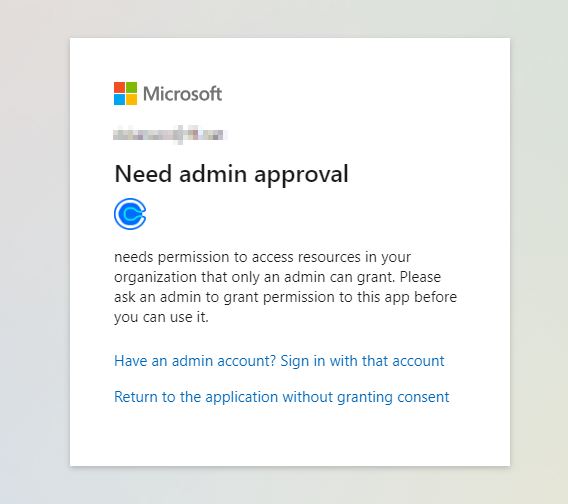
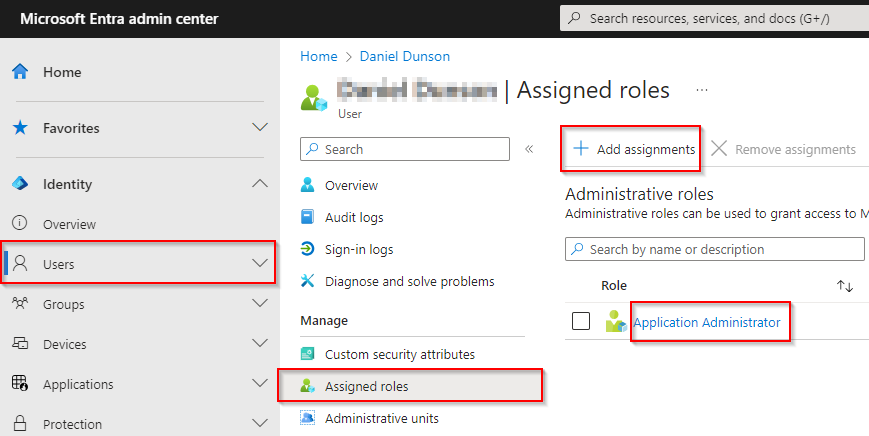
To overcome it, the only solution we have found to date is to assign the user to the Application Administrator role in Azure/Microsoft Entra:
Was this article helpful?
That’s Great!
Thank you for your feedback
Sorry! We couldn't be helpful
Thank you for your feedback
Feedback sent
We appreciate your effort and will try to fix the article