To ensure smooth onboarding for new hires, IT will take the necessary steps to ensure each new employee has the proper network access, hardware, and software set up prior to their start date. IT will be proactive in requesting and obtaining MDM and VPN access forms when appropriate.
For new hires who are starting remotely, a new laptop will need to be shipped to them. The computer should already have the user's profile after logging into the machine under the new user's credentials. This will allow them to log in as soon as they receive the computer.
Once they are logged into Windows, they should connect to the internet, either hardwire or WiFi.
Then, make sure the "User must change password at next login" box in AD is NOT checked, and that the user is set to Bypass mode in Duo. After that, they can connect to the Sophos Connect VPN with their temporary Windows password.
If it does not work, do NOT reset the password in AD as it can cause *even more headaches. The temporary one should work, so if it does not, contact the firewall administrator to review the logs for troubleshooting (i.e. make sure that the user is connecting to the CLE VPN, not using their email address as their username, etc.). If Sophos continues to not connect, the firewall admin may need to delete the user on the firewall before trying again.
Once Sophos is connected, re-check that box in AD and have the user change their Windows password (Ctrl-Alt-Del --> Change Password).
Once their new password is set, have the new user disconnect and reconnect to the Sophos VPN to make sure that syncs up.
When done, you can set them back to Active mode in Duo and they can enroll their cell phone via the enrollment link you sent them through Duo to their work email.
*August 2023 notes:
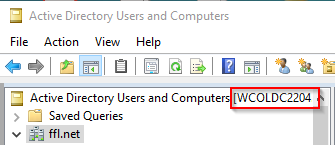
When troubleshooting with remote new hires, we have found that resetting the password in AD does not always help. This is due to the syncing schedule among our DCs (domain controllers). When you use AD, it randomly selects a DC to use. Each Service Desk agent's AD may be pointing to a different DC. They will ultimately with each other, but this does not happen immediately.
Our DCs will sync with each other every 15 minutes, so if you do change the user's password, it may not take effect/be useable in Sophos Connect for 15 minutes. If you change it in AD when pointing to the Columbus DC, it should take immediate effect if the user connects to the COL VPN.
Was this article helpful?
That’s Great!
Thank you for your feedback
Sorry! We couldn't be helpful
Thank you for your feedback
Feedback sent
We appreciate your effort and will try to fix the article